Run your own online practice, under your own name.
Patients book and see you by video on a page that carries your name and colours. You write the notes and sign the scripts in one place. You pay one flat monthly subscription, never a share of your consult fees.
A practice with made-up patients, ready to click through. Nothing you do there is kept.
- No percentage of your fees
- Your patients stay yours
- Your name on your own page
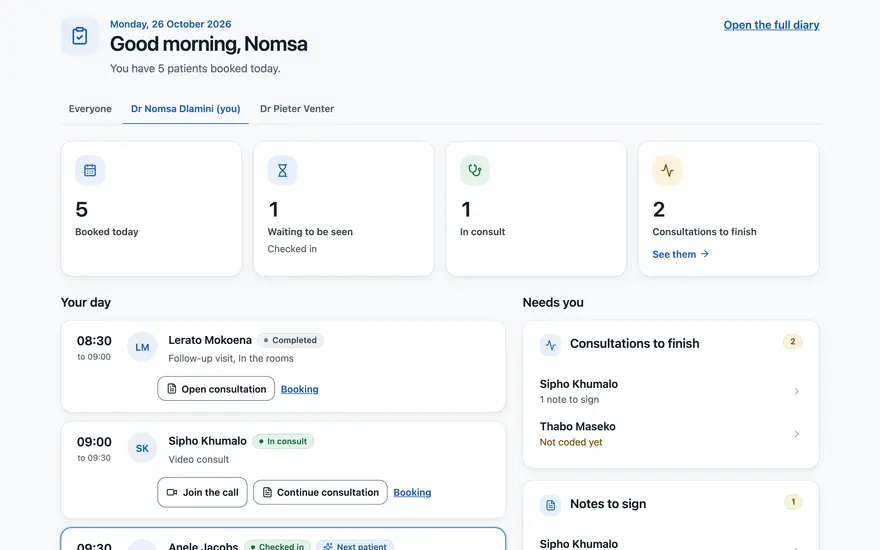
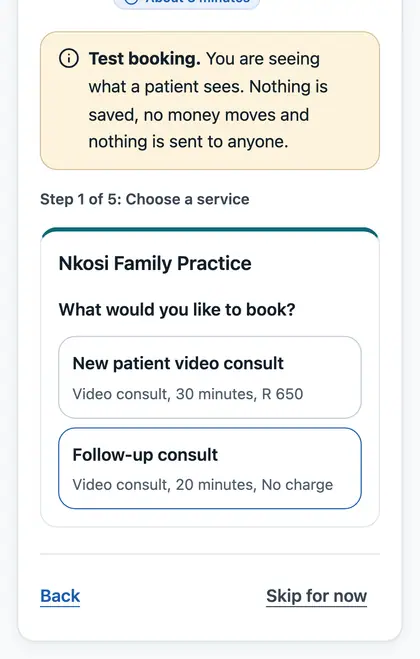
The real app, shown with made-up patients.
What you get, in 60 seconds
Six things, one flat subscription.
- Built
Your own page
In your colours and your name, with a Book a consult button.
- Pilot
Booking
A diary you control, and patients who book themselves.
- Pilot
Video consults
Consent first, then the call opens on Google Meet from your day view.
- Built
Clinical notes
A record per patient, kept by your practice.
- Built
Scripts
Your own pad and stamped signature, printed or downloaded.
- Pilot
Payments
To your own account. We take no share.
One flat monthly subscription. Pilot pricing on request.
Before and after
Your day, before and after
The same morning, with the tools you may be juggling today and with everything in one place.
Today, for many practices
- The diary is in one app, the video link in another.
- Patients phone or message to book, and you re-type their details.
- Notes are written up after the consult, from memory.
- Scripts are written in a different tool, then printed and signed.
- Payment is chased afterwards, and matched by hand.
With VirtualDoc
- One Today view: bookings, status and what needs you next.Built
- Patients book on your page, and give their details once.Pilot
- Notes are written during the consult and save as you type.Built
- Scripts are written, signed and printed from the same record.Built
- Payments are recorded against the booking.Pilot
Items marked Pilot work today for pilot practices. Real patients and live payments open once your practice is verified.
How it works
From first conversation to your first consult in four steps
Step 1: Join the pilot
Tell us about your practice. We will come back to you with the pilot terms and how to get started, at your pace.
Step 2: Set up your practice
Add your details, services, hours, page colours, signature and payments, in your own time.
Step 3: Share your link or QR code
Print your poster with its QR code, or send patients the short link to your page.
Step 4: Consult and prescribe
See the day, join the video consult, write the notes and sign the script. Real patients and payments open once your practice has been verified.

A day in your virtual practice
Follow one consult, from booking to payment
Click through the steps, or press play. These are the real screens you and your patients would use, shown with made-up people.
Step 1 of 6
A patient books on your page
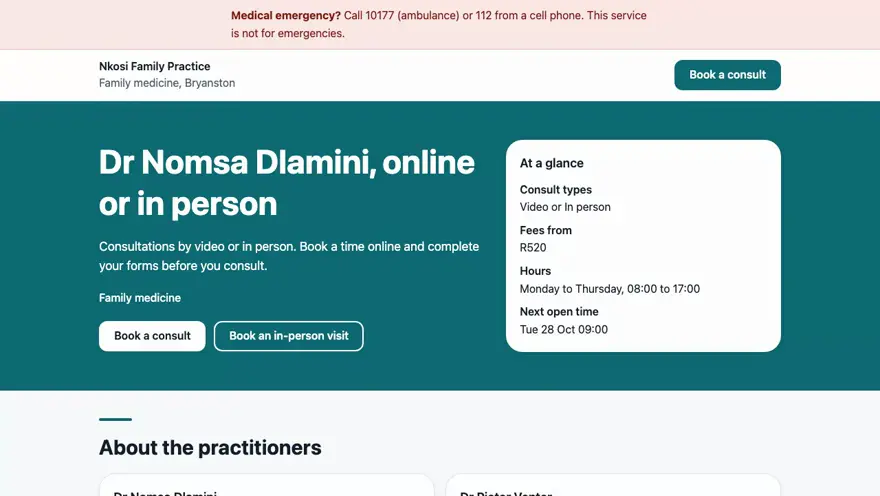
They choose a service and a time that suits your diary. Your page, your name, your colours. Real patients book once your practice is verified.
In motion
Watch it work
Short recordings of the real app, with made-up patients. No sound.
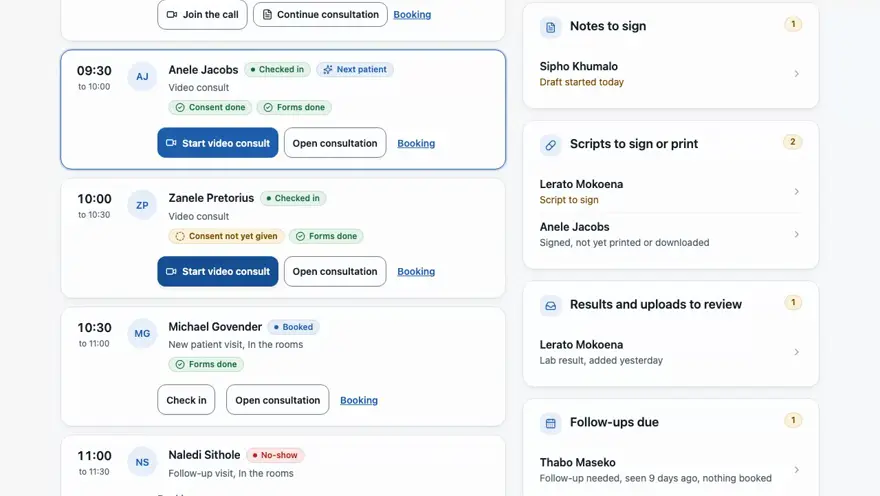
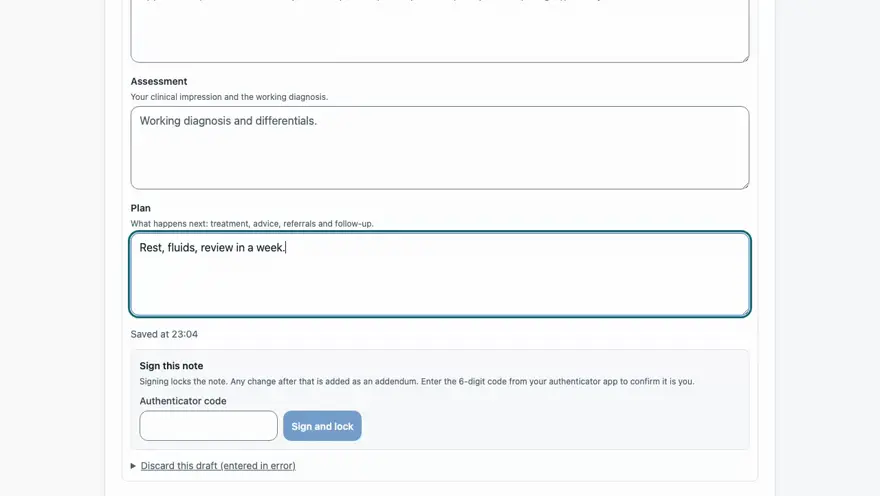
Everything in one place
See the real thing
These are the actual screens, on made-up data. Click any picture to enlarge it. Every item carries a tag, so you can see what is built, what is in the pilot and what is coming soon.
A page that is yours
Patients book with you, under your name.
- A page in your practice's colours, font, logo and wordsBuilt
- A live preview while you edit, and your approval before it goes publicBuilt
- Your own domain, such as drnaidoo.co.za, connected with a DNS recordPilot
Items marked Built exist in the product today. Real patients and live payments open once your practice is verified.
Want to click around yourself?
A practice with made-up patients, ready to click through. Nothing you do there is kept.
See your practice page
Try your name on your own page
Type your name, choose a speciality and a colour. Your page and booking link update as you go.
You can change all of this later. What you type here stays in your browser and is not sent to us.
Your time
Put your own numbers in
Move the sliders to match your week. It is simple arithmetic on your estimates.
Move the sliders to match your own week.
This is your own estimate, worked out from the numbers you chose. It is not a claim about what VirtualDoc will save you.
Set-up guide
Nine short steps, at your own pace
Most steps take a few minutes each. Skip any step and come back to it. The guide shows what is done and what is left.
Step 1: About you
Your details and your HPCSA registration, which VirtualDoc checks before you go live.
Step 2: Services and fees
The consults you offer and what you charge.
Step 3: Hours
Weekdays 08:00 to 17:00 are filled in for you. Change them any time.
Step 4: CalendarComing soon
Optional. Subscribe to your diary as a calendar feed. Connecting Google or Microsoft calendars is coming soon.
Step 5: Practice page
Colours, font, logo and headline, with a live preview.
Step 6: Signature
Draw it or upload it, for your scripts.
Step 7: Payments
Pay at the practice, or online with your own gateway. You can skip this for now.
Step 8: Invite your patients
Your QR code, short link and printable poster.
Step 9: Try it as a patient
Make a practice booking on made-up data. Nothing is sent or charged.
Fair questions
What careful doctors ask before they try something new
Short, honest answers. The full ones are in the questions further down.
Is this allowed under HPCSA rules?
The HPCSA allows telehealth within its guidelines. VirtualDoc asks you to attest to them, takes the patient's consent before each video consult, and checks your registration. It is a tool, not legal advice.
What about POPIA?
You are the responsible party for your patients' information. Each practice's records are kept apart by the database, access is logged, and our staff cannot see patient identities or notes except through an access path that is logged and used only with a reason.
My patients are not good with technology.
Patients use the browser on their phone: no app to install. Your reception can also book a patient in for them, from the diary.
I already have a receptionist.
Good. Roles let reception run the diary and check patients in without seeing what they do not need. Inviting staff by e-mail is coming soon.
Coming soonWhat if I want to leave?
The records are your practice's. A full export tool is coming soon, and before you join the pilot we will tell you in writing exactly how you would get your records out.
Coming soonWhat does it cost?
One flat monthly subscription, never a percentage of your consult fees. Pilot pricing is on request.
Trust and compliance
Plain facts about your data
You are responsible for your patients' information, and the platform is built to help you carry that responsibility.
Each practice's data is separate
Every record belongs to one practice and the database refuses to show it to another. This is enforced in the database, not only in the app.
Built around POPIA
Consent is captured and kept, patients can ask to see or correct their records, and access is logged. These are controls to help you, not a certificate.
You are the responsible party
You decide why and how your patients' information is used. VirtualDoc acts for you as the operator and does not use your patients' records for its own purposes.
No fee-sharing
A flat subscription only. Nothing VirtualDoc charges moves with your consults, messages, video or payments.
Hosted in London
Practice data is stored in London, in the United Kingdom (AWS eu-west-2), not in South Africa. Our sub-processors are listed openly.

See the list of sub-processors.
Pricing
One flat monthly subscription
No percentage of your consult fees, no charge per consult, message or video, and no cut of your payments. Ever.
Pricing on request
We are running a pilot with a small group of practices. Tell us about yours and we will send the pilot terms.
- Your branded page and booking
- Video consults, notes and scripts
- Payments to your own account
- Staff roles (invitations coming soon)
- Pilot support on weekdays
During the pilot there is a safety limit of 100 consults per practice per month. It is a limit, not a charge.
What we never do
- Take a percentage of your consult fees
- Charge per consult, message or video
- Hold or take a cut of your payments
- Use your patients' records for our own purposes
Questions
What doctors ask us
Is online consulting allowed under HPCSA rules?
The HPCSA allows telehealth within its guidelines. Among other things, a practitioner may not provide professional services exclusively through telehealth, and consent is needed. VirtualDoc asks you to attest to this when you set up, collects the patient's consent before each video consult, and checks your HPCSA registration. It is a tool, not legal advice, so please read the HPCSA's telehealth guidance yourself.
Can I use my own domain?
Yes, in the pilot. Your page works on a VirtualDoc address from day one. To use a domain you own, you add one DNS record to prove it is yours and we connect it. Until then, patients use your VirtualDoc address.
How do scripts work?
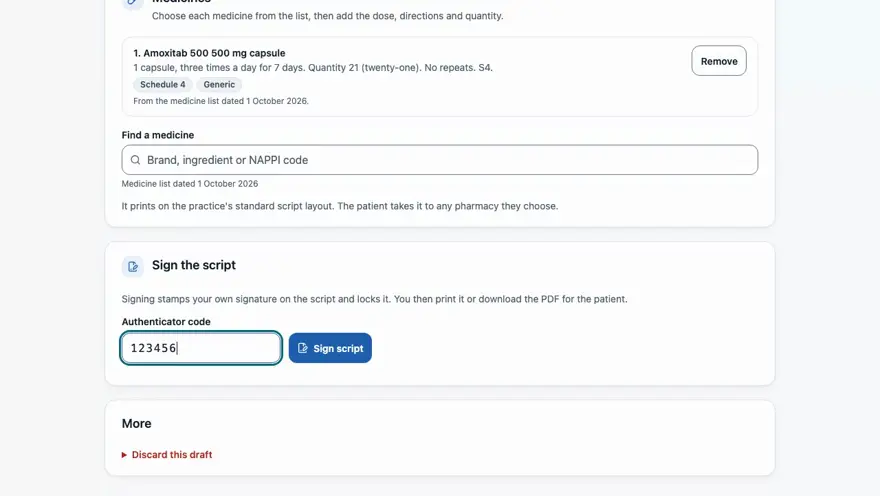
You write them on your own pad inside VirtualDoc, choosing medicines from the National Department of Health list once it is loaded for the pilot, or typing them in. You sign with your stamped signature after a fresh authenticator code, then print the script or download the PDF for the patient. Sending scripts electronically to a pharmacy is not switched on yet and needs a legal check first.
Who gets the payments?
You do. Patients pay at your practice, or online through a payment gateway account in your name. VirtualDoc does not touch the money or take a share of it.
Can I leave, and can I take my data with me?
The records are your practice's, and you can leave at any time. If a practice is closed, its staff keep read-only access. A full data export tool is coming soon, and before you join the pilot we will tell you in writing exactly how you would get your records out.
Who owns my patients' data?
Your practice does, and you are the responsible party under POPIA. Patient records stay inside your practice. VirtualDoc staff cannot see patient identities or clinical content, except through an access path that is logged and used only with a reason.
Are real patients on it yet?
Not yet. Every practice starts in a sandbox. Real bookings, payments and patients open once your practice has been verified. VirtualDoc is open at launch to practitioners registered with the HPCSA Medical and Dental Board.
Talk to us
Talk to us
Tell us a little about your practice, and we will come back to you about a demo and the pilot terms.
Enquiries open soon
We are not taking enquiries through this page yet. Please check back shortly.

Your practice, your name, your patients.
Join the pilot and tell us about your practice. We will take you through the next steps.